Requesting Songs
No app download needed. Everything happens in your browser.
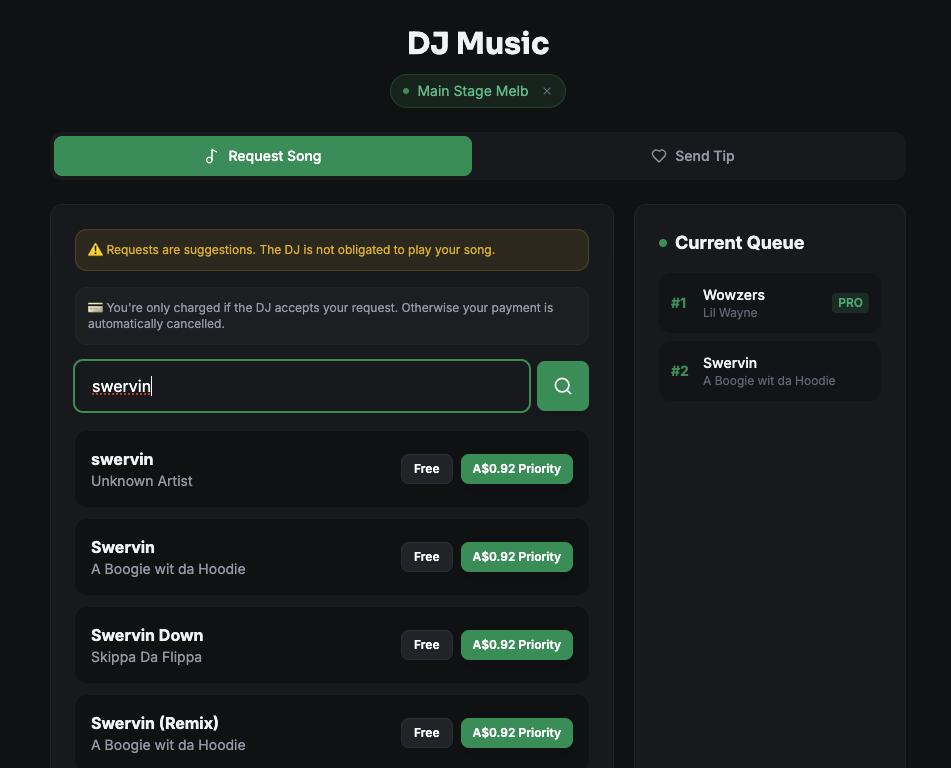
How to request
- Scan the DJ's QR code with your phone camera
- You'll land on the DJ's request page automatically
- Search for a song — powered by Spotify's catalogue
- Select your song from the results
- Choose Free (if available) or Premium (pay to prioritise)
- Enter your name (optional)
- Submit — your request appears in the DJ's queue instantly
Free vs Premium requests
| Free | Premium | |
|---|---|---|
| Cost | $0 | Set by the DJ |
| Queue position | Standard order | Prioritised |
| Availability | If enabled by DJ | Always available |
If the DJ has disabled free requests, you'll only see the premium option.
Searching for songs
The search is powered by Spotify — if it's on Spotify, you can find it. Search by:
- Song title
- Artist name
- Both together (e.g. "Blinding Lights Weeknd")
Select the correct version from the results (explicit, radio edit, live version, etc.).
Will my song be played?
The DJ sees every request but is not obligated to play it. Think of it as a suggestion, not a guarantee. Premium requests are more likely to get played since they're prioritised in the queue.
Viewing the queue
Once you've requested, you can see the current queue on the request page. Your request will appear there.