Managing Requests
The request queue
Your Dashboard → Queue shows all incoming song requests in order. Each card shows:
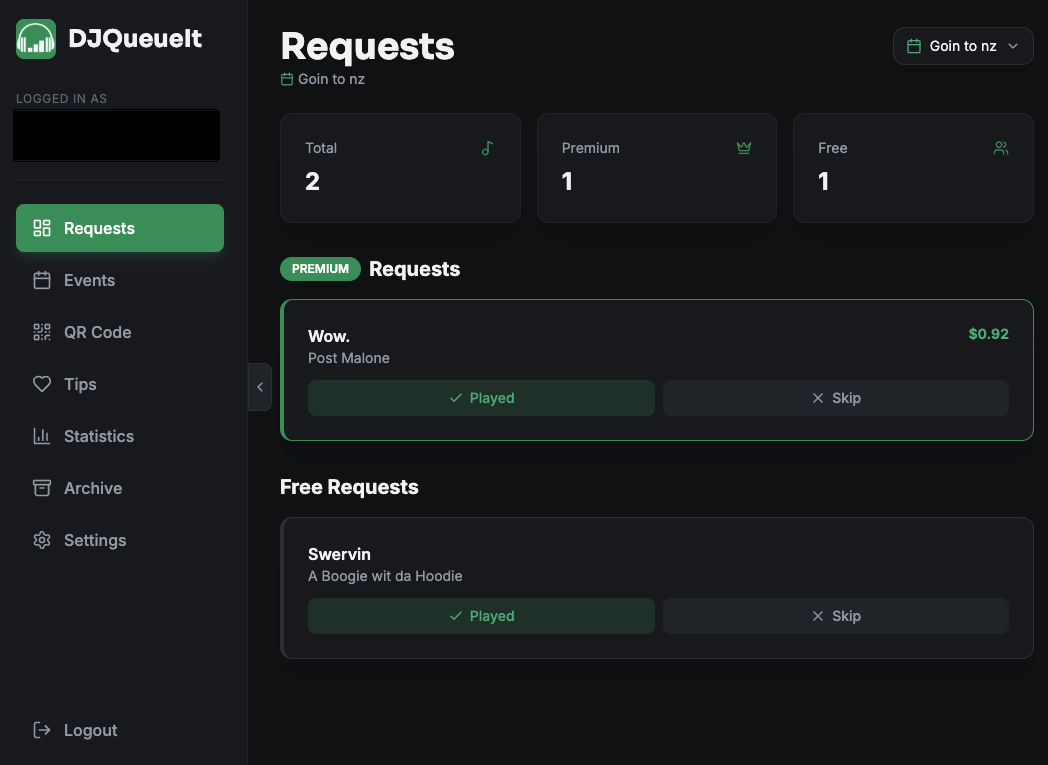
- Song title and artist
- Request type (Free or PREMIUM)
- Position in queue
Premium requests are highlighted and appear at the top of the queue by default.
Request types
| Type | Description |
|---|---|
| Free | Fan submits without paying. Appears in queue order. |
| Premium | Fan pays your set price. Highlighted and queue-prioritised. |
You can disable free requests entirely in Settings if you only want paid requests.
Acting on requests
You're never obligated to play any request. DJQueueIt is a tool — you stay in control of your set.
Use the queue as a guide. Mark songs as played or skip them as needed. The queue auto-updates as new requests come in.
Live updates
The dashboard polls for new requests in real time. You'll see new cards appear without refreshing the page. The green pulsing dot next to "Current Queue" indicates live updates are active.
The archive
Completed requests (played or skipped) move to Dashboard → Archive. You can review the history of any session there. This is also where you can start a refund for an already paid for request.